 Embiody
Schrödinger's Claude in Chrome tab: it only works while you watch
Why AI agents working in Chrome's background tabs slow down, fall asleep, and can even get a support chat disconnected.
I tend to run several things at once. One afternoon in mid-July I gave Claude in Chrome three jobs at the same time. In the first tab it was checking our browser's popup-detection feature, in the second it was looking for background music that fit a video, and in the third it was drafting a complaint to Origin Energy's support, because they had got one of my electricity bills wrong. Once all three were under way I left the browser in the background and went back to the terminal, where I use Claude Code to run my AI dev team. That is the whole point of agents for me: several of them work on their own and I don't have to babysit each one.
When I switched back to the browser a while later, only one of the three jobs had moved. The other two looked like they had dozed off, and they stayed that way after I waited a bit and clicked between the tabs a few times.
Most people's first guess would be a slow network or a slow model that day. But if the network or the model were the problem, all three jobs would have slowed down together, and here only one was moving. I've worked on browsers for many years, and a different explanation came to mind right away: Chrome was throttling the background tabs.
That isn't really a flaw in Chrome. A browser is supposed to do this. A page you aren't looking at has no reason to run at full speed, and people keep dozens of tabs open, so if every one of them ran flat out whether it was in front or not, a laptop battery would be gone in half a day. The trouble is that pages in a browser are no longer only there for people to look at. AI agents work in them too. For a person, a background tab is something they don't need right now. For an agent, that same tab may be waiting on a download, getting a refund through, or holding a support chat that must not drop. A tab nobody is looking at can still have work to do.
Browser rules were written for people, and they fit agents badly.
On July 16 I tested it by hand and confirmed that this was the problem. That was also the day we decided to add a feature called "AI tabs" to Embiody, the browser we build for AI agents. Recently I redid those tests properly, to answer three questions: how far Chrome slows down a background tab; when Chrome freezes a page entirely; and the nastiest one, whether an agent can read the wrong thing from a page that is still open. The results were worse than I expected.
1. Eight minutes pass, the page thinks it's been a minute and a half
I started with the most ordinary countdown page, ticking once a second, written the same way as the countdowns on checkout and payment pages. Every tick, the page reports its progress to a small server on the same machine, so even if the browser freezes the page, the server still has a record of what really happened.
I opened two copies of this page, one opened by Claude in Chrome and one I opened myself for comparison, and then kept both out of sight for 8 minutes. I tried three ways of hiding them: switching to another tab, covering the window completely with another window, and minimizing the window. All three gave almost exactly the same result.
For the first minute after a page went out of sight nothing changed, and the countdown still moved once a second. After about a minute it dropped to one tick per minute. After 8 minutes, 480 seconds had passed in the real world, but the page thought only about 90 had, so it was 390 seconds behind. It's like stepping out for an 8-minute breakfast and coming back to a clock that has moved a minute and a half. And when I brought the window back, the countdown went back to one tick a second, but the lost minutes were never made up.
More important, the page Claude in Chrome opened behaved exactly like the one I opened by hand: 387 to 391 seconds behind for Claude's, 392 for mine. So this has nothing to do with Claude. Any page open in Chrome that nobody is looking at ends up like this, which means anyone running an agent in Chrome will hit it.
(Windows 11, Chrome 157.0.8103.39, Claude extension 1.0.106, November 11, 2026, one machine, 1 to 2 runs per case.)
That raises an obvious question. Claude in Chrome's tabs sit in the background nearly all the time. If a background tab only moves once a minute, how does it ever get anything done? Yet it clearly does finish its work.
2. Only the tab the agent is touching stays awake
To find out, I built a test page closer to a real task, with the two kinds of waiting you see most often on websites. The first is a download: the page says "Your download will start in 90 seconds", and the download button only becomes clickable when the countdown reaches 0. The second is an export: the page says "Export in progress", asks the server every 2 seconds whether it's done, and the server says yes after 90 seconds.
Then I had Claude in Chrome do two of these tasks at once, one in tab A and one in tab B. It worked on A first, and B sat in the background untouched. Here is what happened:
| Case | Time until the download button could be clicked |
|---|---|
| Window in front of me | 90 s |
| A and B open together, agent only working on A | A: 90 s |
| Same, B, first run | B: 407 s |
| Same, B, second run | B: 384 s |
Here is B from the second run, at the moment I brought the window back. Watch how long the page says it has waited:
The page had waited 378 seconds of real time and still had 6 seconds to go. A 90-second wait turned into six or seven minutes, and that is exactly what happened to me that afternoon in July. The agent was working the whole time, but it was always working in A, while B crept along in the background at one tick a minute. By the time it finally looked at B, a countdown that should have finished long ago was still running. And that was the lucky case. If the agent had never come back to B, at one tick a minute that 90-second countdown would have taken about half an hour.
The odd part is that the export was barely affected. The server said it was done at 90 seconds and the agent noticed only 3 seconds later.
Both were waits in a background tab, so why did Chrome slow the download countdown and leave the export alone?
The difference is in how the two waits are written. The countdown sets its own alarm: when this second's alarm goes off it sets the next one, and when that goes off it sets the one after, each alarm chained to the last. The export waits for a call back: it asks the server, and only after the server answers does it schedule the next question, so each round starts fresh from someone else's reply. Chrome has a rule aimed specifically at chained alarms. Once a page has been out of sight for a while, those alarms may only fire once a minute. That's why the countdown slowed down, while the export, which waits for a call back, isn't covered by the rule.
So background throttling doesn't slow a whole page down evenly. How the page is written decides whether it slows down. But that isn't the worst of it.
3. After 20 seconds, the page stops completely
At least the slowdown above eventually gets there. The next one genuinely startled me. Claude in Chrome opens new tabs in the background by default, behind the tab you're looking at. I had it open a test tab and then left it alone, and after just 20 seconds the page stopped completely. The countdown didn't move once a minute, it didn't move at all, until the agent came back and did something in it. I saw this four times, always at about 20 seconds, and the browser window was right there on the screen the whole time, neither covered nor minimized.
The window is in plain view, so why would a page inside it suddenly stop dead?
For comparison, I opened the same page in a background tab the normal way. After 3 minutes it was still running, just down to one tick a minute, so the 20 seconds had to have something to do with Claude in Chrome. I watched the tab strip for a while and finally saw it: about 20 seconds after the agent's last command, Claude's tab group collapsed by itself, and once a tab group collapses, Chrome freezes the tabs in it that have never been shown. Keep an eye on the tab strip in this clip:
Each of these makes sense on its own. Claude in Chrome doesn't want its pile of tabs taking over your tab strip, so it tucks the group away when it goes idle. Chrome treats a collapsed group like things put away in a drawer that you won't need for a while, so it cuts the power to save memory. Put the two sensible rules together, though, and every tab the agent opened in the background falls asleep the moment the agent pauses.
Surely the tab the agent is actually working in is fine? I had the agent look after two tabs, A and B, reading A every 30 seconds for the first 3 minutes. A ran normally the whole time, while B, which nobody touched, had practically stopped from the second minute on. Then I had it switch to reading B. B woke up right away, but about 30 seconds later A, which had just been left alone, was frozen too.
So when an agent touches a tab, that tab stays awake for only twenty or thirty seconds. As soon as the agent turns to something else, or just stops to think a little longer, the group collapses and the tab goes to sleep with it. For a person, that's just the browser saving some memory. For an agent it's much worse, because it has no idea that the page it just left has stopped working.
4. Support never got the YES
A frozen countdown just means something finishes late. A frozen support chat means the job fails. Live support chats, online banking, exam pages and ticket queues all expect you to stay present, and every few seconds they quietly tell the server "still here". Put yourself on the support side of the chat for a moment. If the other end has shown no sign of life for 45 seconds, what do you assume? That they've left, and you close the session. My complaint to Origin Energy in July went through exactly this kind of chat.
I built a support page like that. It checks in with the server every 10 seconds, and the server ends the chat if it hears nothing for 45 seconds. One minute into the chat, support sends: "Reply YES and I will refund it today."
Again I had Claude look after two tabs. It first finished another job in A, which took a minute and a half. Then, the way it does when it goes off to run commands in the terminal, it left the browser alone for a minute and a half. Finally it went back to the support page in B to reply YES. The window stayed on screen the whole time, my own tab was in front, and Claude's tab group was behind it. That's how it normally works, nothing unusual.
Twenty seconds after the agent stopped, Claude's tab group collapsed, the support page in B was frozen, and the check-ins stopped. When the agent came back to B a minute or so later, it found this:
Chat ended: no check-in from this page for 83 s. Please sign in again to start a new chat.
Note that the server cares about how long the page has been silent, not how long the chat has been open. As long as the page keeps checking in, it can sit there as long as you like. B dropped because, once frozen, it said nothing for 83 seconds.
The input box and the send button were already greyed out. The YES could never be sent, support had hung up, and the refund went nowhere. The agent can't sign in again on your behalf either, so this waits until you come back and join the queue from the start. I ran the same task in Embiody, with the agent away for the same minute and a half. There the support page kept checking in every 10 seconds and showed Connected the whole time, the YES went through, and support replied "Done, the refund is on its way." Here are the two side by side, left Chrome, right Embiody:
You might object that earlier I said waiting for the server's reply is immune to the slowdown, and the support check-in works exactly that way, so how did it drop? Right: with throttling alone, the support page would still check in every 10 seconds. What broke it was the freeze. Throttling only makes self-set alarms fire once a minute. Freezing cuts the power to the whole page. Everything in it stops, self-set alarms and waits for a call back alike, so of course the check-ins stop too.
Then why not just have the extension stop collapsing the group? In fact it only collapses in one situation: when the tab showing at the front of the window is one of yours. I tried moving Claude's tab group into a window of its own, so that the front tab was one of Claude's. The extension then didn't collapse, the support page was only throttled, and it stayed connected for 11 minutes straight. But who opens a separate window just for it? Its tab group lives in the window you're using.
Look at it from Claude in Chrome's side and it's stuck. It shares one browser and one window with you. If it doesn't collapse, its tabs stay spread across your tab strip and get in your way. If it does, Chrome freezes them by its own rules. Collapsing is the extension's own product decision and freezing is Chrome's rule, and the extension can only change the first. Even if it never collapsed, its tabs would still sit behind yours, still be out of sight, and still be throttled.
As long as agents are lodgers in a browser designed for people, there's no way out of this. And agents can't do without the browser, because the web was built for people, and people and agents working side by side, in the same browser and on the same sites, is clearly where things are going.
(November 12, 2026, Chrome 157.0.8103.51, extension 1.0.106, one run each.)
5. The page thinks someone is watching, but nothing is being drawn
If that were all, it would already be a big problem. But I found a subtler one. This time the page wasn't frozen, the timers were exact, and the page even considered itself visible, yet its picture was barely moving.
I made a page with two progress bars. The green one moves with time, one step a second. The red one moves with the frames the browser actually draws, a little for each frame. I had Claude work on this page in a background tab for two minutes: click once to play some music, then scroll a list and read the page every 10 seconds. At the end I brought the tab to the front.
The moment it came to the front, the green bar was full and the red bar had barely started. The timer said 184 seconds had passed, but only about 620 frames had been drawn, where at a normal 60 frames a second it should have been around 11,000. In the first 100 seconds it drew just 387 frames, under 4 a second on average, which to a person looks like a slideshow. The page believed it was being watched, but the renderer wasn't actually drawing it.
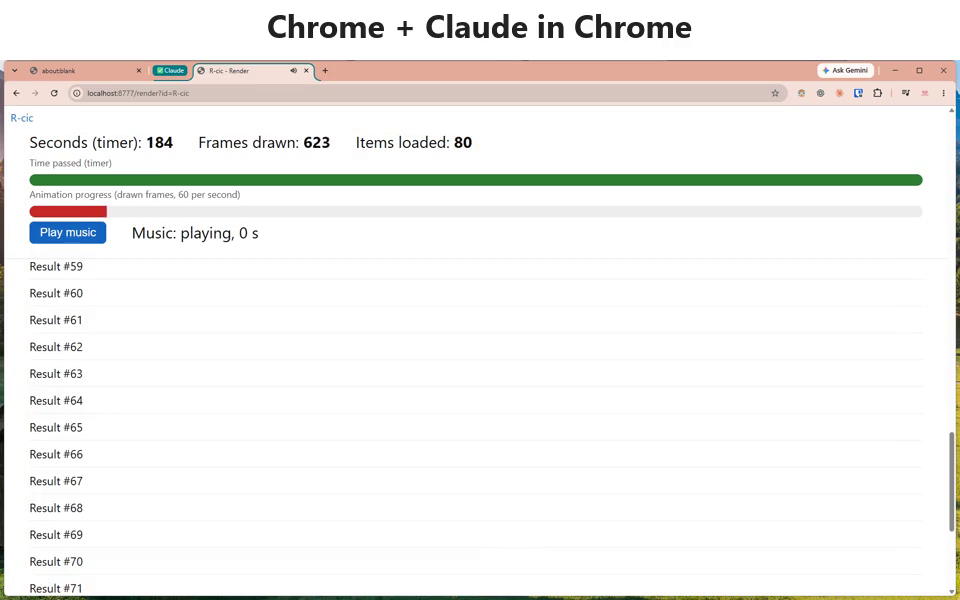
So the picture is drawn slowly. Does that matter? Plenty of sites like to show numbers with animation. Think of the "98,765 companies served" on a corporate homepage, which counts up from 0 when the page opens and settles on the final figure two or three seconds later. If an agent opens a page like that in the background, where nothing is being drawn, the number can be stuck partway.
I built a page that counts from 0 to 98,765 in 3 seconds, had Claude open it in a new background tab, do something else, and come back 10 seconds later to read the number. The results:
| Setup | Number the agent read |
|---|---|
| Chrome + Claude in Chrome, three runs | 73,795, 71,215, 69,619 |
| Embiody + BrowserDo, two runs | 98,765, 98,765 |
This clip shows what the two background tabs were doing while the agent was busy elsewhere:
Chrome gave three different numbers in three runs because the page sat hidden in the background without drawing a single frame, so the number stayed at 0. At the moment the agent came to read it, the extension made the page "visible", the number only then started counting up, and the agent didn't wait for it to finish, so it read whatever the count had reached. It's like photographing someone mid-run: whenever you press the shutter, you catch them halfway down the track.
The worst part is that the agent won't tell you the number might be wrong. There's no error, and it has no way of knowing it saw an animation that hadn't finished. From where it sits, the page opened, the number was read, all fine. If it reads once, it hands you the wrong number as fact. And this is only my own test page. Imagine an agent in a background tab trying to grab concert tickets or a flash-sale item for you.
(November 12, 2026, Chrome 157.0.8103.51, extension 1.0.106.)
6. Schrödinger's tab
All this reminded me of Schrödinger's cat. In that famous thought experiment, until the box is opened nobody can say whether the cat is alive or dead. An agent's tab in Chrome is much the same. While you watch it, it works properly. When you don't, it may move once a minute, or it may already be frozen. When the agent operates on the tab, that's like opening the box for a look, and the tab wakes for a while. When the agent walks away, the box closes again, and this time you can even see the box: it's the tab group that folds itself up.
When an agent runs several jobs at once, it can only operate one tab at a time, and the rest are shut in boxes. Some are only slowed down, some are already frozen, and some look normal but aren't even being drawn, and the agent itself has no idea which state each one is in. So this is about more than things being a bit faster or slower. It decides whether you can trust what the agent hands back to you.
To understand what was behind it, I went through the Chromium 156 source (it behaves the same as the 157 I tested) alongside the code of the Claude in Chrome 1.0.106 extension, and found seven rules stacked on top of each other.
7. What the seven rules actually say
This section goes through the seven rules from the story above one by one against the Chromium source. It's for readers who want to get to the bottom of it or check the source themselves. If you only care about what happens, "background tabs get throttled, frozen, and not drawn" is all you need, and you can skip straight to section 8, "Can't you just turn Chrome's limits off?", without missing anything later on.
1. Chained timers in a hidden page, after a grace period, may only wake once a minute. The Chrome source calls this intensive wake-up throttling. What does that mean? It's the self-set alarm from earlier: a timer fires, and its callback sets the next timer. Chrome counts how deep the chain goes, and from the 7th level on, once the page has been hidden for a while, such timers may only fire once a minute. The countdown is written exactly that way, so it gets caught. A timer set after the server's reply starts counting from level 1 again, so the export and the support check-ins aren't affected. The grace period after a page is hidden is usually 60 seconds, and a tab the agent opened in the background that has never been shown also gets 60 seconds. Switching to another tab, having the window fully covered, and minimizing the window all count as hidden. There are two milder limits as well: no timer wakes more than once a second, and after 10 seconds hidden, all timer callbacks together may use only 1% of the CPU, which only matters for pages doing heavy work in their callbacks. (third_party/blink/renderer/platform/scheduler/main_thread/page_scheduler_impl.cc; nesting level in third_party/blink/renderer/core/scheduler/dom_timer.cc)
2. When a tab group collapses, the tabs in it get frozen. As soon as a group collapses, Chrome casts a "freeze" vote for every tab in it. Tabs shown in the last 5 minutes are protected, and tabs never shown are frozen on the spot. Frozen means every bit of the page's code stops. It isn't slower, it doesn't move at all, like cutting the power to that drawer. (chrome/browser/ui/views/tabs/browser_tab_strip_controller.cc casts the vote; components/performance_manager/freezing/freezing_policy.cc decides)
3. After about 20 seconds idle, Claude in Chrome collapses its own tab group. This only happens when the tab at the front of the window isn't one of its own, and the next time it has work to do, the extension expands the group first. Rule 3 plus rule 2 is the "dead after 20 seconds" we saw above: the extension collapses the group, and Chrome freezes the tabs in it.
4. The extension makes the tab it's working on believe "someone is looking at it". Before each action, the extension uses the debugging protocol to turn on a switch called focus emulation (Emulation.setFocusEmulationEnabled). What does that do? It tells Chrome "this tab is being looked at", so the page's visibilityState becomes visible and its timers are no longer throttled the way hidden pages' are, even if the whole window is minimized. About 20 seconds after the action, the extension turns the switch off again.
Rules 3 and 4 together also explain something strange: why the tab the agent last worked in sometimes isn't frozen when the group collapses. I assumed the extension was deliberately protecting it, but the code showed it's pure coincidence. When the group collapses, Chrome sends a freeze command to each tab in it. The tab the agent last touched still has focus emulation on at that moment, believes it's being watched, and refuses the command. But Chrome's side doesn't notice the refusal, records the tab as "frozen" anyway, and never sends the command again. When focus emulation turns off and the tab really is out of sight, nobody ever comes back to freeze it.
To put it another way: the night warden does lights-out rounds, you call out "someone's still in here", the warden writes "lights out" in the book and moves on, never to return, and after you fall asleep the light stays on all night. This tab stays awake only because "the group collapses" and "focus emulation turns off" happen to occur in that order, and neither the extension nor Chrome designed it that way. Earlier, when the agent moved from A to B, A hit the opposite order: its focus emulation turned off first, so when the group collapsed A was already out of sight, and the freeze took effect as soon as it arrived.
5. A page that isn't actually drawn to the screen gets its frames cut to one a second. Focus emulation can fool the page into thinking it's being watched, but it can't fool the part that draws the picture. Chrome has a compositing service called viz that sends each tab a "start drawing the next frame" signal (BeginFrame) in step with the display. If 3 frames in a row from a tab haven't actually been drawn to the screen by any window, that signal drops to once a second, and the source comment says so plainly: "we throttle BeginFrames to 1 per second" (components/viz/service/frame_sinks/compositor_frame_sink_support.h, kUndrawnFrameLimit = 3). So tabs sitting behind others or in a minimized window can only run requestAnimationFrame (the function web pages use to draw animation) once or twice a second, even with their timers running normally. It's like a camera pointed at a stage: the actors keep performing, but the camera notices nobody is watching the stream and switches to one shot a second. Of the under-4 frames a second I measured, the extra two or three are probably drawn as a side effect of the extension's screenshots.
6. A covered or minimized window also counts as out of sight. On Windows, Chrome works out for itself whether a window is completely covered by other windows, and if it is, treats its tabs as hidden (ui/aura/native_window_occlusion_tracker_win.cc, on by default). When a window is minimized, its whole compositing area becomes 0×0 (desktop_window_tree_host_win.cc).
7. Background renderer processes get demoted too. If a renderer process has no visible tab at all, Chrome drops it to the lowest priority and asks Windows for EcoQoS, which means running it at the CPU's most power-efficient frequency and putting its work on efficiency cores, at the cost of speed (base/process/process_win.cc, kUseEcoQoSForBackgroundProcess on by default). This rule looks at whether the window is really visible, so focus emulation can't fool it.
Each of these seven rules is reasonable on its own, but stacked together they put an agent's tab in an awkward spot. The page thinks it's visible, yet its timers may be throttled. The agent just worked in it, yet a little later it may be frozen. It isn't frozen, yet its picture barely moves. Which tabs are awake and which are asleep is something even the people who wrote the extension might not be able to say. In the end it comes back to the same thing: browser rules were written for people.
8. Can't you just turn Chrome's limits off?
You might think that since Chrome's rules are to blame, you could turn them off with launch flags. Partly, yes. --disable-background-timer-throttling, --intensive-wake-up-throttling-policy=0, --disable-renderer-backgrounding and --disable-backgrounding-occluded-windows turn off timer throttling and process demotion. But the frame rule can't be turned off. A tab that isn't drawn to the screen doesn't get its normal frames back because you disabled timer throttling, so reading a half-finished count still happens.
9. The same tests in Embiody
We build Embiody, a Windows browser made for AI agents. Agents work in it through BrowserDo, an MCP server built for it. Claude Code and Codex connect with one command, and Cursor and Claude Desktop with a few lines of config. The AI tabs feature started with that afternoon in July: I wanted agents to do several things at once while I got on with my own work.
So I ran all the tests above in Embiody under the same conditions, changing only the browser to Embiody and the tool to BrowserDo. The results:
| Test | Chrome + Claude in Chrome | Embiody + BrowserDo |
|---|---|---|
| Tasks A and B at once, window minimized, agent only working on A: how long B's 90-second wait took | 407 s, 384 s | 90 s |
| Window on screen, test page behind another tab, agent working in it the whole time: frames | under 4 a second | as smooth as a foreground tab |
| Background stats page counts from 0 to 98,765 in 3 s, agent reads it 10 s later | 73,795, 71,215, 69,619 | 98,765 |
| Window on screen with your tab in front, agent leaves the support page for a minute and a half, then replies | chat ended, reply can't be sent | stayed connected, reply sent |
In Embiody, task B finishes on time even when it's behind other tabs, untouched, in a minimized window. The page the agent works on in the background keeps being drawn, the stats number reads right the first time, and the support chat stays connected. This only applies to tabs the agent is using, though. Tabs you open yourself are still throttled in the background under the usual power-saving rules, so having an agent in the browser doesn't make your own tabs use more power. The cat in the box stays awake. To be fair, this was one Windows machine and 1 to 2 runs per test for Embiody, nothing like a large-scale test, but in these scenarios at least the difference is clear.
One more thing to be clear about: these problems aren't specific to Claude in Chrome. Whatever extension or automation tool you use, an agent working in Chrome has to live by Chrome's rules. In the countdown test at the start, the tab I opened by hand fell more than 390 seconds behind in 8 minutes, just like Claude's. There are also two rules I didn't run into this time. When the computer is short of memory, Chrome unloads the background tab that has gone longest without being looked at, and it reloads when you come back. And when a laptop is unplugged with the battery under 20%, background tabs using a fair amount of CPU get frozen. A person who steps away and hits one of these just refreshes when they're back. An agent that runs all afternoon looking after several pages at once will hit them sooner or later.
10. AI needs its own browser
After a few years of getting work done with AI, I'm more and more sure of one thing: AI needs its own browser, and making do with Chrome is a stopgap.
I'm not saying Chrome does a bad job. These rules were refined over many years so that the person sitting at the screen has a better time: tabs you can't see should use less, animations nobody sees don't need drawing, and pages left unused for a long time should be frozen or even unloaded. All an extension can do is add another layer on top of those rules, like using focus emulation to make a page think someone is watching, or collapsing its tab group so the agent's tabs stay out of your way. But the rules are Chrome's, and Chrome's architecture was designed for people. Without changing it at the core, an extension can only patch things up.
The tab from earlier, the one where the warden wrote "lights out", is what patching gets you. It stays awake only because two things happened to occur in a particular order. Any new Chrome version could change that order, and coincidences like this can't be avoided or predicted, because Chrome was never designed for agents.
To stop relying on coincidence, the browser's own rules have to take agents into account. For a person, whether a tab is visible decides whether it should keep using resources. For an agent, a tab nobody is looking at may be in the middle of something for you that can't be paused, and it should keep working whether or not anyone is at the screen. That can only be settled in the browser engine itself, and it's the principle Embiody's AI tabs are built on.
(Embiody: 1 to 2 runs per test, November 11 to 12, 2026, same machine.)
What I didn't test
- One Windows machine and one Chrome version. When I tested by hand in July, my memory is that the slowdown only became obvious after 5 minutes; this time (Chrome 157) it was about 1 minute. I don't know whether Chrome changed or I misremembered.
- No Mac or Linux, and nothing with Memory Saver turned on.
- Unloading tabs under memory pressure and freezing tabs on low battery are from reading the source only, not measured.
Try it yourself in two minutes
Open https://embiody.com/lab/background-tab/. It starts a 15-minute countdown. Switch to another tab (covering or minimizing the window works too), come back after two minutes, and look at "Behind by": that's how many seconds the countdown lost while you were away. 0 s would mean the page kept running on time.
Finally
I don't know whether Chrome will ever change these rules for agents. Its reasons are good ones: saving power, saving memory and keeping the foreground smooth are exactly what a browser should do. It's just that the browser assumed a person at the screen, looking at one tab at a time, and now there may be nobody at the screen at all, with an agent behind the tabs looking after several pages at once.
If you don't watch it, it doesn't work. But an agent's work is exactly the work that happens while you aren't watching.